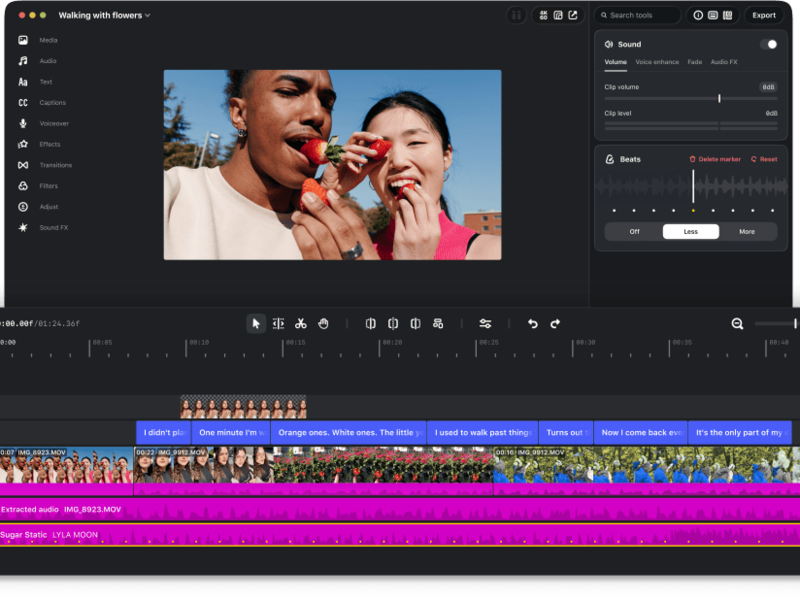
Instagram has launched Edits for Mac, bringing its video editor to a larger screen and opening its editing tools to connected AI agents. The Verge reports that a creator can ask an agent to prepare a rough cut, then open the project in Edits and continue working manually.
Gulf News also covers the launch as a free desktop alternative to CapCut. For creators, it introduces a useful possibility: delegate the first assembly while keeping control over the finished story. The launch also gives people who prefer to edit by hand a more capable desktop workspace.
What the desktop app offers
According to Instagram’s official desktop page, Edits is free to download and requires a Mac with Apple silicon, meaning an M1 chip or later, plus an Instagram account to sign in. Its editing toolkit includes:
- A multi-track timeline, keyframes, layered audio, and waveforms for precise cuts.
- Color wheels and curves, with support for importing LUTs and fonts.
- Automatic captions and access to Instagram’s audio libraries.
- Multiple aspect ratios, direct Instagram publishing, and watermark-free 4K exports.
That combination gives a small team more room to work through a complicated edit. A talking-head video with supporting footage, captions, music, and several revisions quickly becomes awkward on a phone. Seeing those layers together can make it easier to judge pacing and spot mistakes before delivery.
AI can prepare the edit, and the creator can finish it
The distinctive addition is MCP support, which lets a connected AI agent use the desktop app’s editing tools. In an interview with The Verge, Edits product lead Matthew Simari described using Meta’s Muse to assemble footage from a downloads folder into a rough cut. The resulting project can then be opened for manual editing. He said the integration also supports agents beyond Muse.
Our reading is that the valuable part is the handoff. A useful first assembly should reduce the work needed to reach an editable draft. The creator still decides which moment deserves the opening, whether a reaction needs more breathing room, and whether the finished sequence sounds like them.
A sensible test would use footage from a completed job. Compare the agent-assisted draft with your normal process and count the time spent correcting it. Faster assembly only helps if the cleanup does not consume the saving.
The mobile-to-desktop handoff still has a gap
At launch, the desktop app is available on macOS, with no Windows or Linux version. The Verge also reports that editing the same project across mobile and desktop is still in development. Saved audio and text styles from the mobile app are available on desktop, but that does not yet extend to a shared editing project.
Plan around that limitation when choosing where a job starts. A creator filming at a Dubai event should decide how the footage will reach the editing machine and where revisions will happen before promising a same-day delivery. Existing Edits mobile workflows remain useful for work that needs to stay on the phone.
What this changes for creator businesses
For a solo creator, the first opportunity is a repeatable format: a weekly venue roundup, a product demonstration, or an interview series. These jobs have a familiar structure, making it easier to judge whether an automated first pass actually helps.
Write a short editing brief before trying the agent. State the intended audience, approximate length, essential shots, and the point the viewer should remember. A clear brief also gives you a consistent basis for reviewing the result. Keep the source footage and a clean export so the work remains useful across publishing destinations.
For brands, agree on the deliverables and approval process. An AI-assisted draft may arrive sooner, but the campaign still needs accurate product information, readable captions, suitable music, and the creator’s judgment. Budget for that review when setting deadlines and revision rounds.
For UAE campaigns involving both Arabic and English, check captions, names, and line breaks in each version. The test is whether the final video communicates well to its audience; the editing method is only one part of getting there.
CreatorMarket take
Edits on Mac makes Instagram’s production tools more relevant to creators handling larger projects. Its agent connection could shorten the path to a first draft, while the desktop timeline gives creators room to refine the result.
Start with one familiar production and measure the full job, including corrections and client revisions. If the workflow saves time while preserving quality, expand its role. A better editing tool earns its place through the work it helps you deliver.
Header image: Instagram / Meta, via Gulf News.